
Do NDIS Meta Ads Work? The Short Verdict
Meta ads put your organisation in front of people before they start looking. That’s their strength and their limit.
They work when the job is reaching people who aren’t searching yet. Think of a support worker who’d switch jobs for better shifts. Or a family who’ll need SIL in six months, or a carer in a new area who’s never heard of you.
Someone who needs a provider this week behaves differently. That person types a search into Google. Meta can’t catch that moment as reliably.
So the verdict depends on the job. For recruitment, vacancies, launches and local trust, Meta is often the strongest paid channel an NDIS provider has. Urgent participant enquiries are different. There, Meta is usually a supporting channel, not the lead one.
Where Meta Ads for NDIS Providers Work Best
Support worker recruitment
Recruitment is where Meta often outperforms everything else. Good support workers are rarely scrolling job boards. They’re on Facebook and Instagram, and a well-targeted ad can reach them in the suburbs you need covered.
NDIS recruitment ads work best when they’re specific. Name the suburb, the shift pattern, the type of support and what makes your team a good place to work. “Support workers wanted” with a stock photo competes with every other provider in Australia.
Send applicants to a short form or a careers page that screens for the basics. Ask about location, availability, driver’s licence and NDIS Worker Screening Check status. Screening up front saves your coordinators hours of calls.
Filling SIL and SDA vacancies
A vacancy in a Supported Independent Living (SIL) home or Specialist Disability Accommodation (SDA) property needs the right person, not just any enquiry. Meta lets you show the home, the area and the support model to families, carers and support coordinators in the region.
These ads take longer to produce a result than recruitment ads. The decision involves families, coordinators, plan managers and the participant. Your ad needs to start that conversation and give coordinators a clear way to refer.
Keep the ad about the home and the support. Show the rooms, the garden, the local shops and transport. Don’t describe the ideal resident by disability type. Let the creative and the details bring the right people forward.
Launching a new service or area
Starting in a new region means nobody knows your name. Meta can build awareness among families, carers and coordinators there before you need enquiries.
Run awareness and video campaigns first. Follow up with people who engaged, using an enquiry or referral ad. Expect this to take months, not weeks.
Building trust with families and carers
Families choosing a provider want to see who the support workers are and how you operate. Short videos of your team, your values and your approach to choice and control build that familiarity.
This is where paid ads and organic content overlap. Your ads perform better when your page already shows a real, active organisation. For the organic side, see our guide on NDIS social media marketing.
Where NDIS Meta Ads Fall Short
Participants, families and coordinators who need support now usually search for it. They type “SIL provider [suburb]” or “in-home support near me”. That’s high intent, and it happens on Google.
Meta can still produce participant enquiries. They tend to be earlier stage and need more follow-up before they become a service agreement. If your goal is new participants in the next few weeks, start with search.
For the search side, see our page on Google Ads for NDIS providers. Read Google Ads vs Facebook Ads for NDIS providers for a full side-by-side breakdown of both platforms.
Why Most NDIS Facebook Advertising Fails
The same mistakes come up in almost every account we audit.
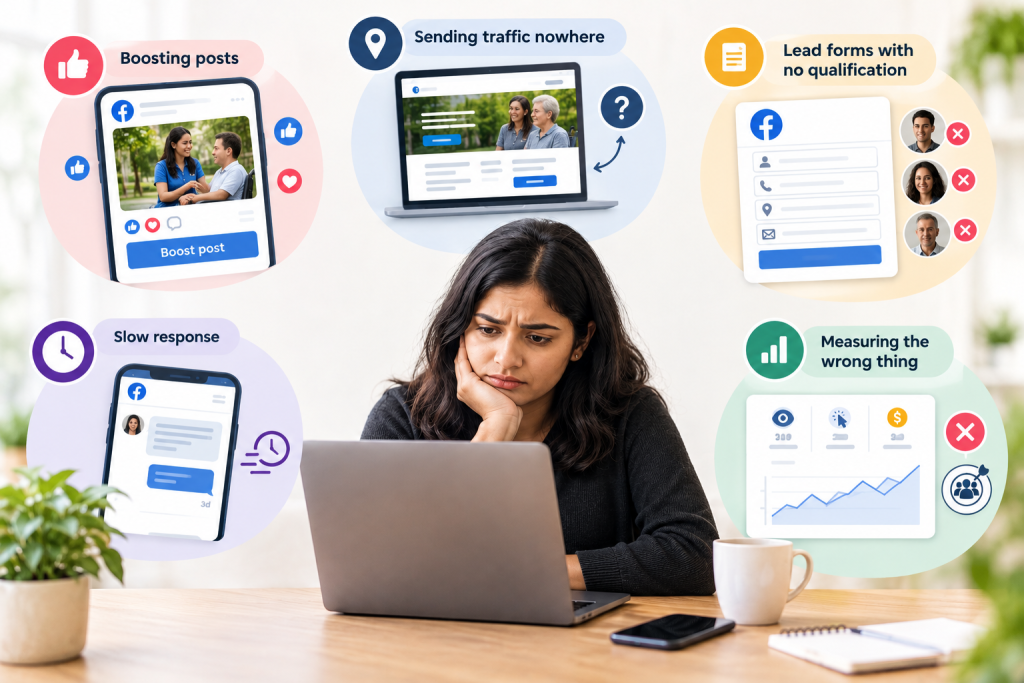
Boosting posts. A boost optimises for likes and comments. It reaches people who engage with content, not people who need support or want a job. Engagement looks good and produces almost nothing.
Sending traffic nowhere. The ad links to a homepage with no clear next step. Coordinators wanting to refer can’t find the referral form. Support workers can’t find the job. Every campaign needs a page built for it, with one clear action. That’s the job of proper NDIS website design.
Lead forms with no qualification. Meta’s instant lead forms are easy to fill in. Too easy. Without screening questions, you get names and numbers from people who tapped by accident, live outside your area or don’t remember applying.
Slow response. A lead contacted three days later has often moved on or forgotten you. This is especially true for recruitment, where good workers get snapped up within days.
Measuring the wrong thing. Reach, clicks and cost per lead all look fine in Ads Manager. None of them tell you whether anyone became a participant or started a shift.
Meta Policy Limits NDIS Providers Need to Know
Meta’s policies change often. Everything below reflects how the platform has worked, but check Meta’s current advertising policies before you launch. Some of these limits can change what your campaign can do.
You can’t target people by disability
Meta has removed detailed targeting options tied to sensitive topics, including health conditions. You can’t target people by disability, diagnosis or NDIS participation. Any guide that tells you otherwise is out of date.
Realistic targeting looks like this:
- Location. The suburbs and regions you actually service.
- Broad audiences. Adults in your area, letting Meta find responders based on who engages.
- Custom audiences. People who’ve visited your website or engaged with your page, where your account and policies allow it.
- Lookalike audiences. Built from data you collected with proper consent, where available for your ad type.
The real targeting work happens in the creative. An ad that clearly describes in-home support in a specific area attracts the people it’s meant for. Everyone else scrolls past.
Be careful with customer lists. Uploading participant details to Meta raises serious privacy questions. Only use contact data where you have clear consent for that use, and get privacy advice if you’re unsure.
Health-related data and tracking limits
Meta places limits on how some health and wellness businesses can use website data and conversion events. Some accounts are restricted in what they can track and which events they can optimise for.
Check Events Manager to see whether your site or ad account is affected. If it is, your campaigns may not be able to optimise for enquiries the way an unrestricted account can. That changes how you measure results and often means tracking more outcomes offline, in your own CRM.
Special ad categories
Support worker recruitment ads may fall under Meta’s employment-related special ad category. SIL and SDA vacancy ads may raise housing-related rules, depending on current policy and region.
Special ad categories can restrict age, gender and location targeting. Check whether your ad falls under one before launching. Getting this wrong can lead to rejected ads or restricted accounts.
NDIS Rules That Apply to Your Ads
Meta’s policies are only half of it. NDIS rules apply to every ad you run.
Participant funding can’t pay for advertising. Your marketing budget comes from your organisation, not from NDIS plans.
No misleading claims. The NDIS Code of Conduct requires providers to act with honesty and transparency. Don’t overstate your registration, capacity, availability or outcomes.
AHPRA rules for registered health practitioners. If your allied health team includes practitioners regulated by the Australian Health Practitioner Regulation Agency (AHPRA), their advertising must follow AHPRA’s rules. That includes restrictions on using testimonials about clinical aspects of care.
Consent before featuring participants. Get written consent before using any participant’s image, voice or story in an ad. Consent should cover where the content will appear and for how long, and be easy to withdraw.
Respectful language. Never use “suffering from”, “wheelchair-bound”, “special needs” or pity framing. Write about what support looks like and what people choose to do.
None of this is legal advice. Check current requirements with the NDIS Quality and Safeguards Commission and, where relevant, AHPRA.
How to Set Up Meta Ads That Produce Participants and Hires
Pick the right campaign goal
Choose the objective that matches the job. Lead or enquiry objectives suit recruitment and referrals. Awareness or video views suit new-area launches and trust-building. Running everything as one boosted post serves none of them.
Write creative that self-selects
Your ad copy does the targeting Meta no longer allows. Be specific about the service, the area and who it’s for.
A participant-focused example:
“Looking for in-home support in [suburb]? Our team supports adults with disability with daily living, shopping and getting out into the community. You choose your support workers and your schedule. Ask about availability.”
A recruitment example:
“Support workers needed in [suburb]. Weekday and weekend shifts in community access and in-home support. Current NDIS Worker Screening Check required. Apply in two minutes.”
Use your real team and settings. Generic stock photos look like every other provider.
Qualify every lead
Add two or three screening questions to every lead form. For participant enquiries, ask for suburb, type of support and whether the enquirer is a participant, family member or coordinator. Recruitment forms should ask about location, availability and screening check status.
Fewer leads with better details beat a pile of names nobody can reach.
Respond fast
Set a same-day contact rule for every lead. Assign one person to own the inbox, with a backup. For recruitment, call within hours where possible.
Track outcomes, not leads
Record every lead in your CRM or a simple spreadsheet. Mark which ones became intake meetings, service agreements or hires. This matters even more if Meta’s tracking is limited on your account.
How Much to Spend on NDIS Meta Ads
There’s no correct budget for every provider. Work it out from what one new participant or one new hire is worth to you.
Use this formula. Monthly ad spend divided by new participants (or hires) gained equals cost per participant (or cost per hire). Compare that to the yearly value of one participant, or the cost of a vacant shift you can’t fill.
A hypothetical worked example
These numbers are made up to show the method. Use your own.
Say you spend $1,200 in a month on community access ads and get 40 leads. Fifteen answer the phone and are in your area. Six book an intake meeting, and two sign a service agreement. Your cost per new participant is $600.
Now check the leaks. If only 15 of 40 leads are reachable, your lead form needs better screening. Where six intake meetings produce two agreements, look at what happens in those meetings, not at the ads.
When to pause
Pause recruitment ads once your rosters are covered. Once a room is filled, stop the vacancy ads. Keep a small awareness budget running in new areas if you plan to grow there.
What to Track Every Month
- Leads by campaign: Shows which ads produce volume.
- Contact rate: Shows how many leads you actually reached. A low rate points to weak screening or slow response.
- Qualified leads: Shows how many fit your area, services and requirements.
- Intake meetings or interviews: Shows whether qualified leads move forward.
- New participants and hires by source: The outcome that pays for the ads.
- Cost per participant and cost per hire: The numbers that decide whether a campaign stays on.
- Response time: Shows whether slow follow-up is losing people.
FAQ
Yes, for specific jobs. Meta ads work well for support worker recruitment, SIL and SDA vacancies, new service launches and building trust with local families and carers. They’re less effective for urgent participant enquiries, where people search on Google. Results depend on specific creative, qualified lead forms, fast follow-up and measuring participants and hires rather than reach or likes.
No. Meta has removed detailed targeting options tied to sensitive topics such as health conditions, so you can’t target people by disability, diagnosis or NDIS participation. Use location, broad audiences, and custom or lookalike audiences built from data collected with consent. Specific ad copy about your service and area does the rest. Check Meta’s current policies before launching.
Often, yes. Recruitment is one of the strongest uses of Facebook ads for NDIS providers. Name the suburb, shift pattern and support type, and screen applicants with short questions about location, availability and NDIS Worker Screening Check status. Check whether your ad falls under Meta’s employment special ad category, which can limit targeting options.
Work backwards from value. Divide your monthly spend by new participants or hires gained to find your cost per participant or cost per hire. Compare that against the yearly value of one participant or the cost of unfilled shifts. If the cost is well below the value, the spend is justified. Pause when vacancies or rosters are filled.
Only with written consent from the participant, or their legal decision-maker where appropriate. Consent should cover where the content will appear, for how long, and how to withdraw it. If your team includes AHPRA-regulated practitioners, extra restrictions apply to testimonials. Check current requirements with the NDIS Commission and AHPRA before publishing.
Run both through Meta Ads Manager and let placement data show you where results come from. Instagram ads for NDIS providers often suit recruitment of younger support workers and short video content. Facebook often reaches families, carers and coordinators. Judge each placement on qualified leads and outcomes, not cost per click.
Get Help with Your NDIS Meta Ads
BuzzPilot is based in Perth and runs NDIS campaigns across Australia remotely. We build Meta campaigns around policy limits from day one, screen leads properly and track results through to participants and hires.
See our full NDIS marketing services for how ads fit with your website and SEO. To see how we build NDIS websites that turn visitors into referrals, read the Earth Disability Services case study.
Call 0470 249 058 or Book a Free Audit.